01
Registration (HIS)
Creates the patient and visit identifiers.
Connect registration, orders and results so authorized clinicians can follow the right patient’s visit.
Discuss a pilot at your site ↗
The hospital information system creates identifiers for the patient and the visit. The electronic medical record sends the order to the radiology information system. The exam is performed and the images are stored in the picture archiving and communication system. The approved report and image link appear in the clinical record according to the user’s permissions.
The archive holds the images. The approved report returns to the visit record with a link for authorized users.
Reference workflow for registration, laboratory orders and radiology studies
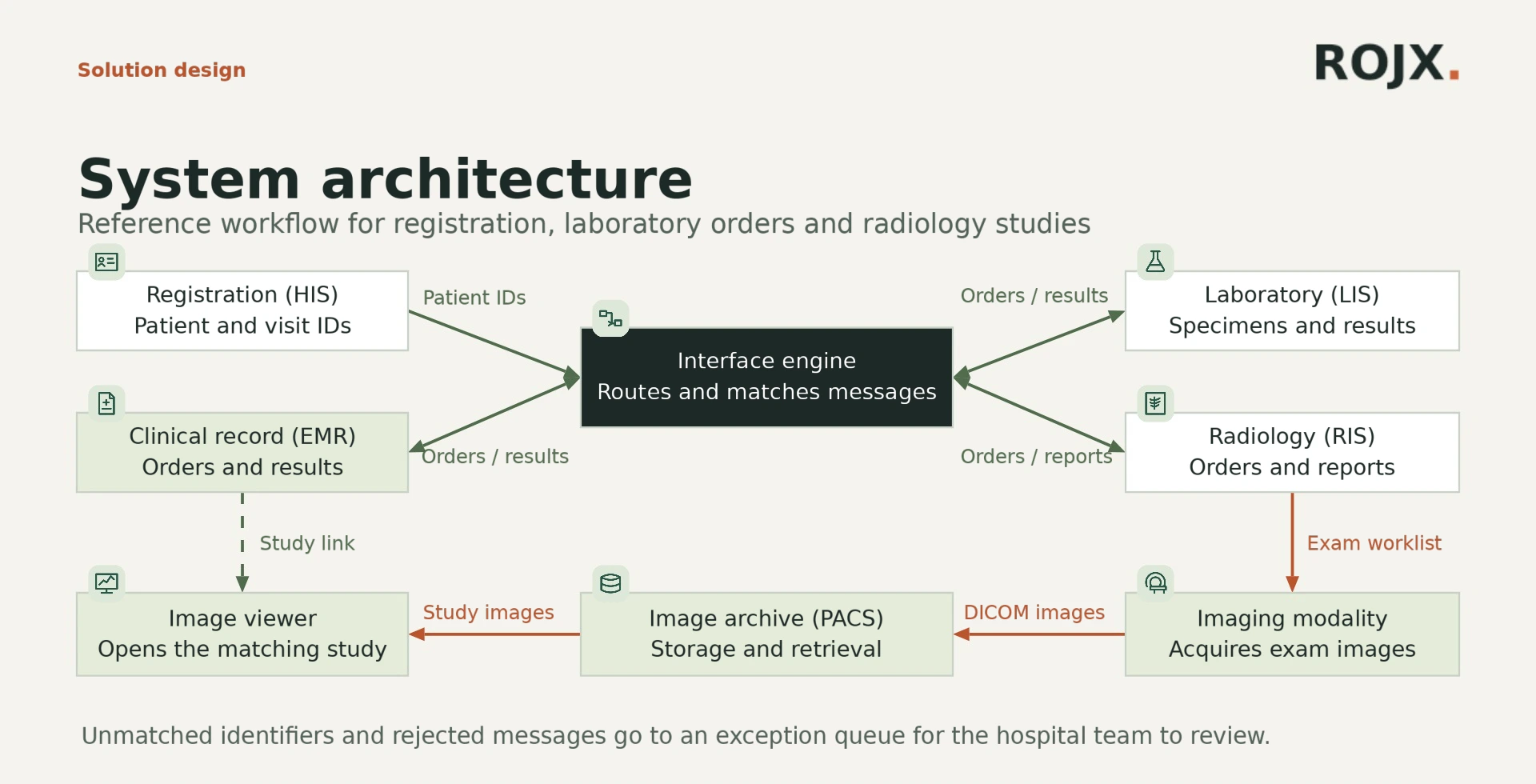
Creates the patient and visit identifiers.
Sends orders and displays results and reports.
Routes messages and maps identifiers across systems.
Tracks specimens and returns verified results.
Schedules exams and issues approved reports.
Acquires images for the ordered exam.
Stores studies for retrieval.
Opens the authorized study from the patient record.
Holds rejected messages for review.
Include the IT lead, the clinical lead and both application vendors in the interface review.
Discuss a pilot at your site ↗The imaging archive stores the study. The approved report returns to the visit record with a link for authorized clinicians.
Unmatched messages enter an exception queue for the hospital team. Test this workflow using synthetic patient data and agreed matching rules.
Application versions, sample messages, patient identification policy and vendor interface fees.